100% Offline-First Native macOS App

Summon clipboard history.
Instantly. Effortlessly.

MindClip is a premium, sandboxed clipboard manager designed to stay entirely out of your way. Save code snippets, color palettes, links, and text commands securely on your local storage.
MindClip HUD Window

Engineered for pure speed.

SwiftData Engine

MindClip uses Apple's native SwiftData framework inside a local sandboxed container. This translates to incredibly fast lookup speeds, automatic storage compression, and zero CPU usage when idle.

100% Offline

No database syncing, no servers, and zero network payloads. Your copied tokens, passwords, and source files remain inside sandboxed user storage.

Cursor-Centered HUD

Summon a clean search box under your current focus area instantly. Navigate list records with arrow keys and copy back with Enter.

Context Inspector

MindClip automatically detects hex values to render interactive color palettes, reads URLs for direct browser launch actions, and highlights multi-line code structures with ease.

01. HUD INTERFACE

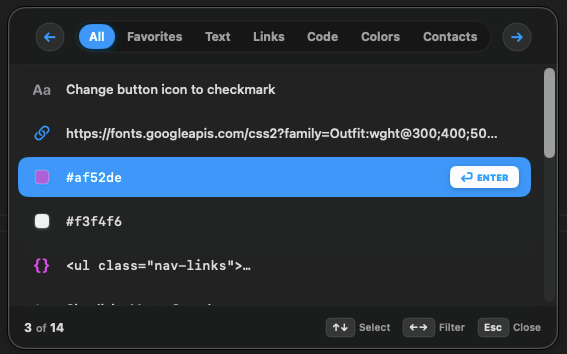
Phantom HUD Window

Summon a native, centered floating overlay instantly. Type to query your history, navigate selections cleanly with keyboard arrow keys, and paste back instantly without losing your focus.

  • Summon with a custom global key combination
  • Category filter toggles to easily search text, code, links, and colors
  • Ultra-minimalist interface built strictly for speed
MindClip HUD Window
02. MENU BAR TRAY

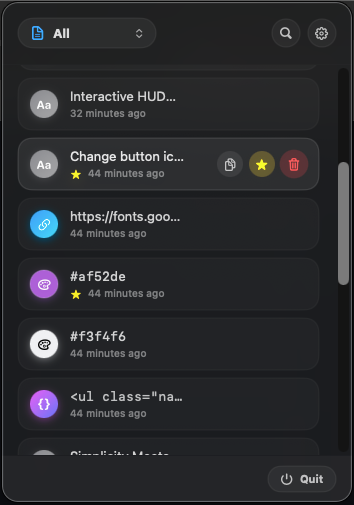
Status Popover Menu

A small status window sitting quietly in your macOS menu bar. Click to quickly review latest items, mark favorites, delete entries, and access app preferences.

  • Silent helper running in system bar
  • Hover quick actions to copy, delete, or favorite
  • Quick search matching substrings instantly
MindClip Menu Bar Popover
03. INSPECTOR

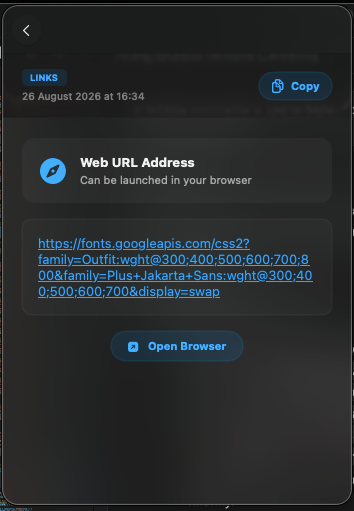
Detailed Preview & Actions

Understand the contents of your clipboard. MindClip automatically extracts color coordinates, previews hex codes, counts characters, and formats links.

  • Swift hex code swatches previews
  • Safe URL browser routing tags
  • Detailed creation history logging
MindClip Inspector Panel
04. CUSTOMIZATION

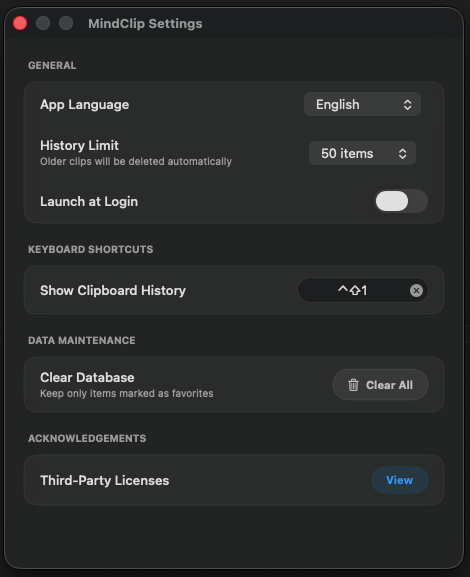
Flexible Preference Control

Tailor MindClip's behavior to your workflow. Change localized languages, limit maximum database items size, and bind custom keystrokes.

  • Clean keyboard shortcut recorder
  • Custom database history thresholds limits
  • Full localization interface support
MindClip Preferences settings
MindClip App Icon

Upgrade Your Mac Clipboard.

Summon clipboard history instantly. Simple, lightweight, and native.
100% Free on the App Store.

Download on the App Store